

Target Audience
Claude Code users
Techniques
Plugins and Marketplaces
GitHub
my-claude-marketplace
This article is a layman’s write-up of how Claude Code packages skills, agents, and commands into plugins and then marketplaces. Knowing this will help you decide how to use and organise marketplaces.
Recap: Commands, Agent Skills, and Agents
Good to know: The names and descriptions of all three — commands, skills, and agents — are loaded into context when you start Claude Code. Claude knows about them no matter if they’re in your project or globally in ~/.claude/. However, they differ in how Claude invokes them:
Commands are explicit. You type /my-command-name to invoke manually. They’re repeatable prompts for your easy access. Claude will rarely invoke these itself, but you can instruct it. These ADD to your context.
Agent Skills are automatic. Claude matches your instruction against installed skill descriptions and uses them when relevant. You ask “extract text from this PDF” and if you have a PDF skill installed, Claude loads it and uses it. These ADD to your context too.
Agents run in separate context. Like skills, agents can trigger automatically based on their description, or you can invoke them explicitly by name. You design them to have focused expertise to take action and can be built to invoke agent skills.
This invocation difference matters when you’re deciding what to create:
- Want control over when something runs? → Build a command
- Want Claude to automatically apply expertise? → Build an agent skill
- Want Claude to spin up a brother in another context? → Build an agent
Now at this point you may have commands, skills, and agents scattered in multiple versions across multiple projects. Or maybe you have it all in ~/.claude/ but not in source control. A way around this is to collect them into a bag and call it a “plugin”. The entire plugin bag is either enabled or not.
A Plugin is a Folder
A plugin is a folder where you can organise this mess. It contains a required manifest (name, description) plus any combination of optional components. Think of it as a “bag of components”:
[plugin-name]/
├── .claude-plugin/plugin.json # Manifest (REQUIRED)
├── commands/ # slash commands .md
├── agents/ # new context window (.md)
├── skills/ # extends capabilities (.md)
├── hooks/ # reacts to events
├── scripts/ # eg. for hooks to run
└── .mcp.json # external tools to use
How Claude Discovers Components
At startup, Claude Code loads components from three locations:
| Source | Paths | Scope |
|---|---|---|
| Plugins | ~/.claude/plugins/(commands, agents, skills) | Global (user) |
| Personal | ~/.claude/commands/~/.claude/agents/~/.claude/skills/ | Global (user) |
| Project | .claude/commands/.claude/agents/.claude/skills/ | Current project |
Each of the files in these directories have a name and a description field in its YAML frontmatter at the top of the file. Claude uses this to decide when to invoke:
# Agents: agent .md frontmatter
---
name: code-reviewer
description: Expert code reviewer. Use proactively after code changes.
---

# Skills: SKILL.md frontmatter
---
name: pdf-processor
description: Extract text from PDFs. Use when working with PDF files.
---
The name and description fields are critical — it’s how Claude discovers when to use a skill or agent. Claude sees a flat list of all components from everywhere. It doesn’t know or care which plugin or marketplace they came from.
By now that’s a new word, what’s a “marketplace”?
A Marketplace is a Collection of Plugins
Plugins can be packaged together and shared as a “marketplace”. It is just a way to package plugins together and easily share and install the package. Like plugins, marketplaces are purely for humans—Claude Code doesn’t care.
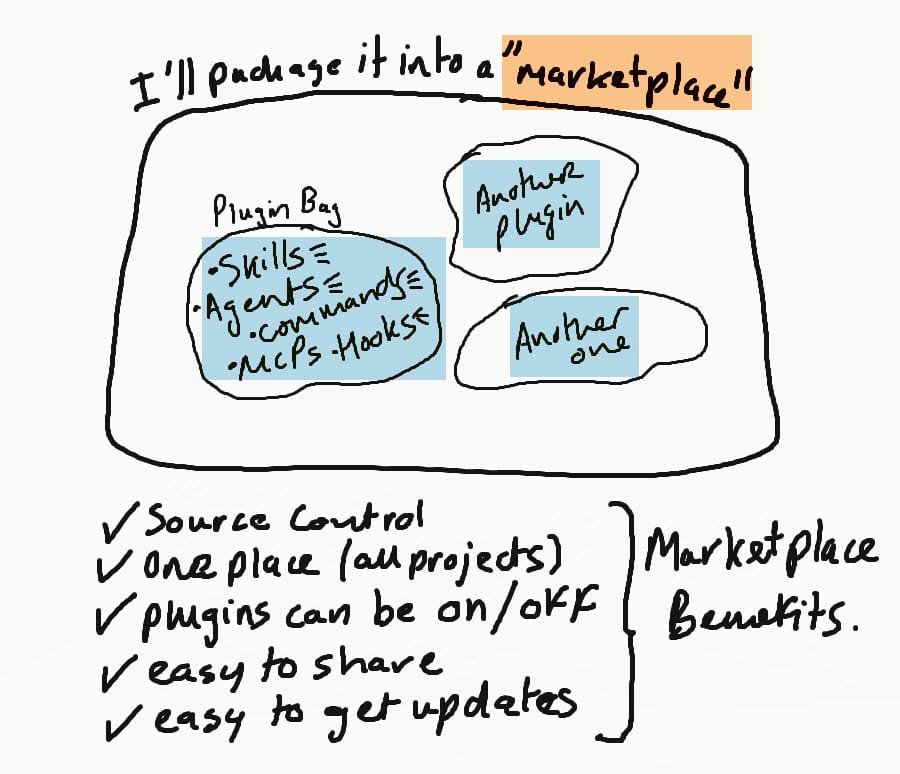
Okay, I’ll make a marketplace:
For instance, say I created 4 of my own plugins and I want to share them with my friends. I would create a Git repo “my-4-plugins-marketplace”, put these 4 plugins in there, include a marketplace.json manifest, and publish to GitHub. Then I would give the GitHub repo URL to my friends and tell them to install by running:
/plugin marketplace add github_username/my-4-plugins-marketplace
This clones my GitHub repo into their ~/.claude/plugins/ along with a few other files. Even so, my friends must still explicitly install each plugin to use them. To do this run /plugin:
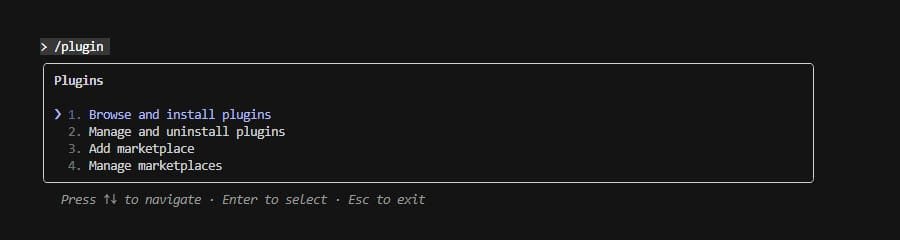
Now say I update two skills and an agent in one of my four plugins and push this to GitHub. To get the updates, my friends again just need to run /plugin and work from there.
So that’s great, I have everything in one place. It’s easy to update. But what if my friend only wants to use one plugin but not the other three. That’s fine, he just installs that one and not the others.
A Marketplace Example
Anyone can make and publish a marketplace of plugins that contain skills and other components:
| Source | GitHub / URL |
|---|---|
| Anthropic | • https://github.com/anthropics/claude-plugins-official • https://github.com/anthropics/skills |
| (Anthropic mentioned) | • https://skillsmp.com (or https://skills.sh) • https://github.com/lackeyjb/playwright-skill |
| (can put skills into your marketplace) | • https://github.com/einverne/dotfiles/tree/master/claude/skills |
Take https://github.com/anthropics/skills as an example. If you look inside the manifest file .claude-plugin/marketplace.json, this marketplace is called “anthropic-agent-skills” and has:
- A plugin called “document-skills” that contains 4 skills (nothing else)
- A plugin called “example-skills” that contains 12 skills (nothing else)
- Inside of the skills/ directory you will see the 4+12=16 skills.
Now:
- Add the marketplace:
/plugin marketplace add anthropics/skills - Then install either or both plugins via
/plugin
To what actually gets done behind the scenes, explore it:
# See what plugins you have installed
$ tree -a -L 4 -I '.git' ~/.claude/plugins

/home/mp/.claude/plugins
├── installed_plugins.json # still empty must "install" marketplace plugins
├── known_marketplaces.json # now has "anthropic-agent-skills" marketplace
└── marketplaces
    └── anthropic-agent-skills # our new marketplace (repo clone)
        ├── .claude-plugin/marketplace.json # definition (2 plugins)
        ├── skills # The 16 skills (collected into 2 plugins)
        │   ├── algorithmic-art
        │   ├── brand-guidelines
        │   ├── canvas-design
        │   ├── doc-coauthoring
        │   ├── docx
        │   ├── frontend-design
        │   ├── internal-comms
        │   ├── mcp-builder
        │   ├── pdf
        │   ├── pptx
        │   ├── skill-creator
        │   ├── slack-gif-creator
        │   ├── theme-factory
        │   ├── web-artifacts-builder
        │   ├── webapp-testing
        │   └── xlsx
        ├── spec/agent-skills-spec.md
        └── template/SKILL.md

# See your known marketplaces:
$ cat ~/.claude/plugins/known_marketplaces.json

{
  "anthropic-agent-skills": {
    "source": {
      "source": "github",
      "repo": "anthropics/skills"
    },
    "installLocation": "/home/mp/.claude/plugins/marketplaces/anthropic-agent-skills",
    "lastUpdated": "2025-12-07T12:52:20.312Z"
  }
}

# See the installed plugins (I have none installed):
$ cat ~/.claude/plugins/installed_plugins.json

{
  "version": 1,
  "plugins": {}
}
Assuming you installed both plugins from the marketplace, restart Claude and do a little test that it’s automatically in your context:
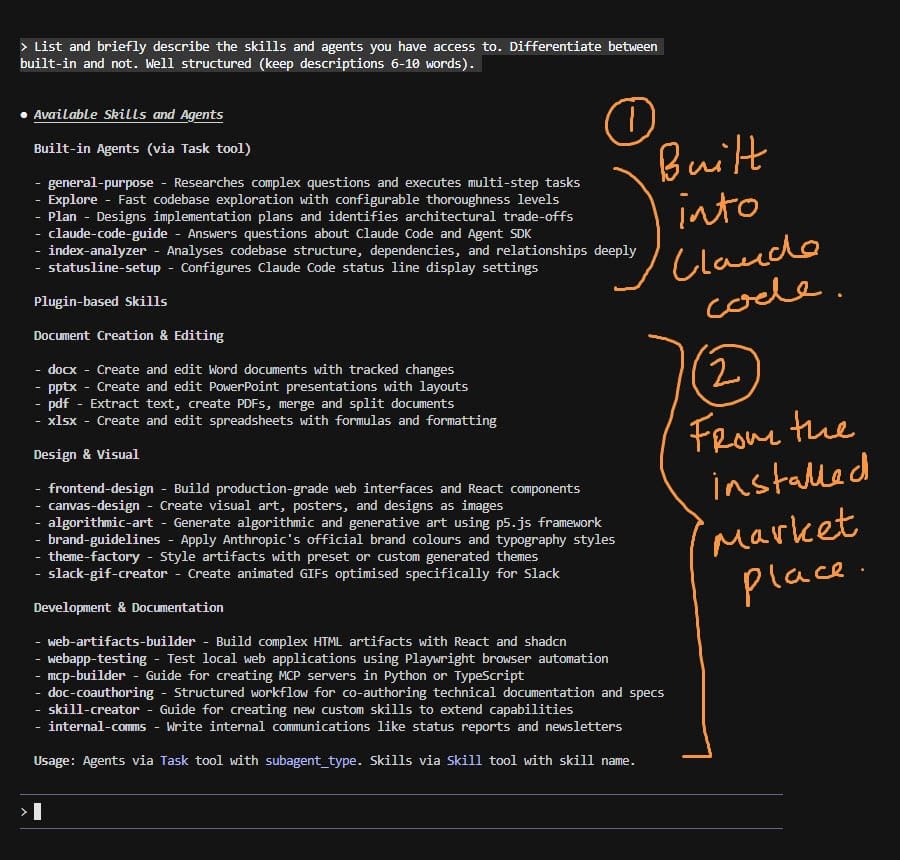
In theory, whenever you issue an instruction to Claude Code it ought to match and use any applicable skills or agents that could be useful. For example “create a PDF that explains…” should automatically use the PDF skill. I have found it more efficient to rather mention the specific skill or agent in the instruction over hoping it gets invoked.
There are many skills in this marketplace that I will never use. The upside in keeping the skills in the original marketplace they came from is in the ease of updating. The downside is all names and descriptions get loaded into your context. Although small, I suspect this diminishes the ability to automatically trigger too. Another option is to create your own marketplace and exact only those components that you want. But of course, should say Anthropic update a skill, you will need to manually incorporate that change yourself.
Appendix
Anthropic Claude Blog
Improving frontend design through Skills
Best practices for building richer, more customized frontend design with Claude and Skills.
Building Skills for Claude Code: Automating your procedural knowledge
Learn how Skills can help you package your team’s workflows, schemas, and business logic into reusable instructions that Claude Code loads automatically.
How to create Skills: Key steps, limitations, and examples
Learn how to write tailored skills that deliver stronger, more effective outputs from Claude.
Anthropic Claude Code Docs
• https://code.claude.com/docs/en/sub-agents
• https://code.claude.com/docs/en/skills
• https://code.claude.com/docs/en/plugins
• https://code.claude.com/docs/en/slash-commands
